 |
 |
 |
|
 |
|||
 |
|||
| T.3.6 Tailoring Forms |

 Contents Contents
|
|
|---|
T.3.6.1 Using the Forms
There are individual forms for the system generation, the quality assurance, the configuration management, and the project management of each project type. The basic structure of these tailoring forms is illustrated in Table T.9. Individual fields are specially identified by numbers.
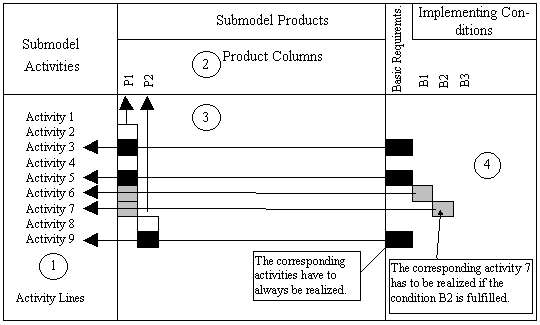
Figure T.8: Basic Structure of the Tailoring Forms
To Field 1: Activity Lines
All activities of the corresponding submodel are listed in the lines.
To Field 2: Product Columns
All products of the corresponding submodel are listed in the columns.
To Field 3: Allocation of Products and Activities
The vertical boxes (without considering the content) inform which activities contribute to the generation of a product. (Example: the activities 2 to 7 generate product P1, activity 8 and 9 generate product P2).
To Field 4: Basic Requirements and Implementing Conditions
The boxes have to be understood as indicators referring to the activities in the same line of field 1.
These indicators have the following meaning:
- Indicators of the Basic Requirements
The indicators of the basic requirements (black boxes) refer to the activities always to be realized for the corresponding project type. If such activities contribute to the product generation, then the corresponding boxes for subproducts in field 3 are filled in with black.
(Example: the activities 3, 5 and 9 must be realized. In this connection, two subproducts have to be generated for product P1 and one subproduct for product P2.)
Basic requirements consider the minimum requirements in section T.2.1.1 Consideration of the Minimum Set.
- Indicators of the Implementation Conditions
The indicators of the supplements (underlaid boxes) refer to activities which have then to be additionally realized when implementing Conditions are true. If such activities contribute to the generation of a product the corresponding boxes in field 3 are underlaid for the subproducts.
(Example: If the conditions B1 and B2 are true, activities 6 and 7 must be realized in addition to activities 3, 5, and 9. In this connection one subproduct must be additionally generated for product P1 and for product P2.)
If several implementing conditions are identified in one line of the forms, this must be interpreted as "or" condition.
Note: The indicators in field 4 may contain numbers referring to the tailoring forms. These footers refer to additional references that must be observed during the realization of the activities to which one of the indicators is referring.
T.3.6.2 Collection of Forms
A separate form is available for system development, quality assurance, and configuration management. Furthermore, there is one form for each small and medium sized project and in large projects one form for each project management.
Notes with regard to form footers:
- The footers on the forms for the system generation usually contain additional conditions for the realization of activities referred to by indicators. These footers are self-explaining.
- The footers on the forms for the quality assurance and the configuration management contain restrictions for the realization of activities the indicators refer to.
(Example: if an indicator with footer "for products x, y and z" refers to an activity, this activity must only be realized for products x, y and z, and not, however, for other possible products.)
Tailoring Forms:
SD for Small Administrative IT Projects
SD for Medium Administrative IT Projects
QA and CM for Small and Medium Administrative IT Projects
SD for Large Administrative IT Projects
QA and CM for Large Administrative IT Projects
SD for Small/Medium Technical-Scientific IT Projects
QA and CM for Small /Medium Technical-Scientific IT Projects
SD for Large Technical-Scientific IT Projects
QA and CM for Large Technical-Scientific IT Projects
SD for Selection, Procurement and Adjustment of Off-the-Shelf Products
QA and CM for for Selection, Procurement and Adjustment of Off-the-Shelf Products
PM for Small and Medium IT Projects
PM for Large IT Projects
|
|
|
This page online • GDPA Online • Last Updated 03.Mar.2004 by C. Freericks |