 |
 |
 |
|
| Annex 1 | |||
| 4.14 Interface CFM-STM |
 Contents Contents
|
|
|---|
1 Characterization of the Interface
The interface CFM - Control Flow Modeling-STM - State Transition Modeling is of type "direct integration of another basic method at a certain point of the operational sequence of the corresponding method". Both methods are closely connected within the complex method SA/RT - Structured Analysis with Real-time-Extensions. While the control flow model describes the structural connection of
- processes,
- control flows, and
- control stores,
When creating models, the control flow model is preset for the control specification, i. e. it is only possible to describe the interaction of system states and control flows after they have been identified.
2 Example
The following illustrations explain the interface CFM-STM.

Figure 4.18: Example Control Flow Diagram
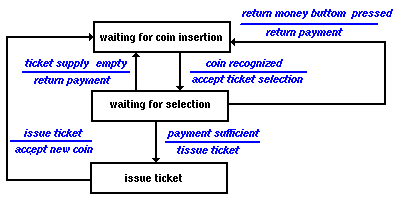
Figure 4.19: Example State Automaton
| action | active process | ||
|---|---|---|---|
| return exchange money | issue ticket | accept ticke selection | |
| accept ticket selection | 0 | 0 | 1 |
| return payment | 1 | 0 | 0 |
| accept new coin | 0 | 0 | 0 |
| issue ticket | 1 | 1 | 0 |
Explanation:
The control flow diagram (Figure 4.18) illustrates which actions are initialized by which events. Events are represented by control flows from processes to control bars. The state transition diagram (Figure 4.19) illustrates the system states that are differentiated within the model. If the system has a state (example "waiting for coin insertion") in which an event becomes effective (example "coin recognized") then the system changes to the next state (example "waiting for selection") and initiates an action (example "accept ticket selection". The allocated process activation table (Figure 4.20) illustrates that this initializes process "accept ticket selection".
3 Tool Support
Elementary rules exist for the interaction of control flow and control specification. These rules can be automatically checked by means of tool support. This refers particularly to tools supporting SA/RT.
4 Literature
| /Hatley, 1987/ | Includes several examples for realtime modeling in section VI. |
| /Raasch, 1991/ | Chap. 5 explains the interaction of the components by means of examples. |
|
|
|
 GDPA Online
Last Updated 01.Jan.2002
Updated by Webmaster
Last Revised 01.Jan.2002
Revised by Webmaster
GDPA Online
Last Updated 01.Jan.2002
Updated by Webmaster
Last Revised 01.Jan.2002
Revised by Webmaster
|